Stock optimization5 min read
How to Set a Reorder Point and a Target Level for Each Product
A practical way to decide when to order and how much, based on average daily usage, supplier lead time and a sensible safety buffer, with an illustrative example and advice on reviewing levels for seasons such as Ramadan and Eid.
MIRSAD Editorial Team
Practical content on inventory and warehouse management
Two questions come up in every warehouse: when should we order from the supplier, and how much? Order too late and the product runs out, costing sales and customer trust. Order too early or too much and cash is tied up in stock on the shelves, with a higher risk of damage or expiry. A reorder point and a target level are two simple tools that turn these questions into a clear rule you can review.
Three inputs you need before any calculation
- Average daily usage: how much of the product is issued per day on average, calculated from actual issues over a recent period that reflects normal activity.
- Lead time: the number of days from issuing the purchase order until the goods are in the warehouse and ready to issue, not the shipping time alone.
- Safety buffer: extra stock that protects you against a late supplier or a sudden rise in demand, usually expressed as a number of days of usage.
The more these inputs come from your own data rather than guesswork, the closer the results will be to reality.
To find the real lead time, go back to past purchase orders for each supplier and compare the date each order was issued with the date it was actually received in the warehouse. You will often find that the real time differs from what the supplier quotes, and that it varies from one order to the next. Take the average, and pay attention to orders that ran very late: that variation is exactly what safety stock is meant to cover.
The reorder point: when to order
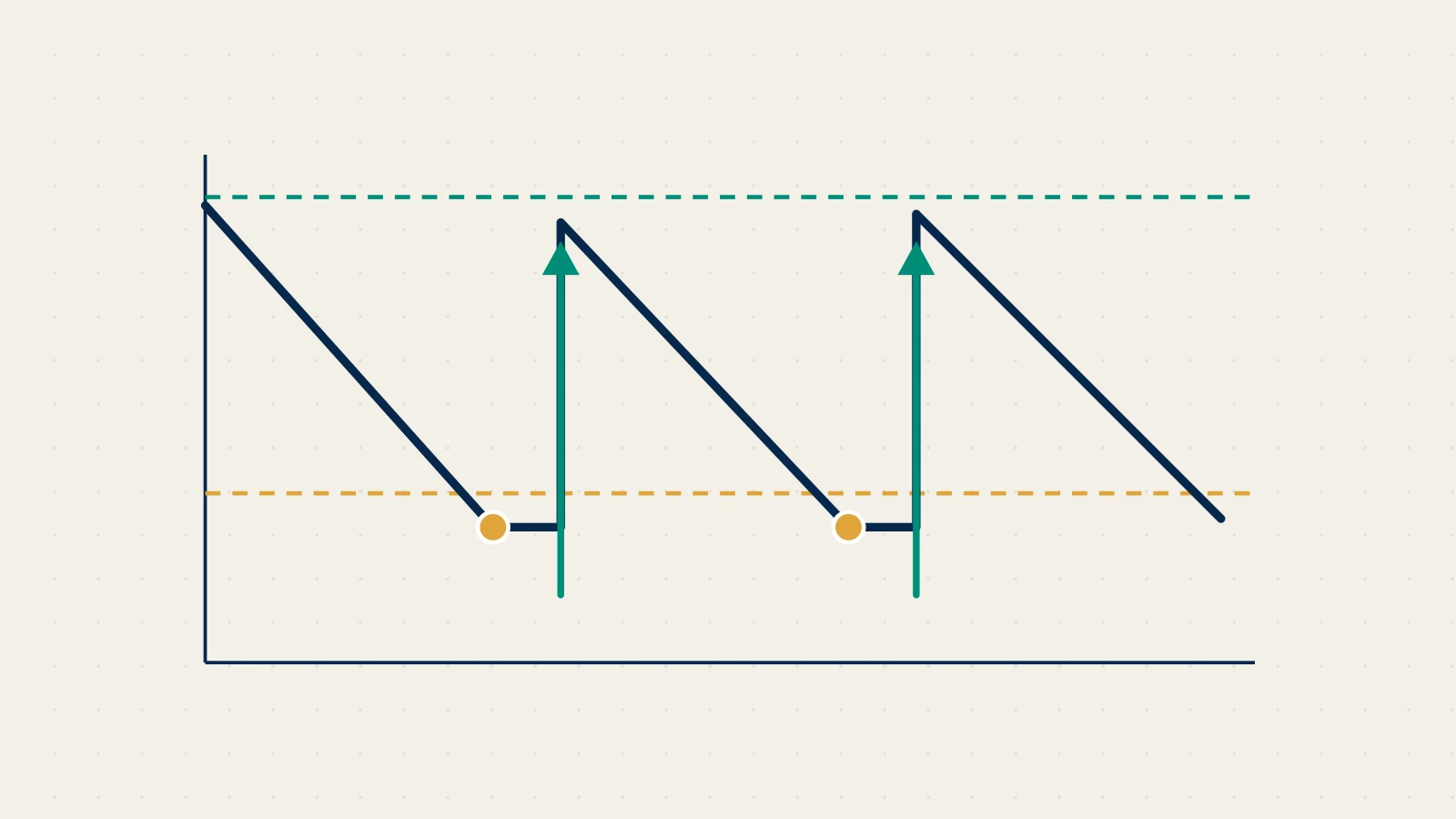
The reorder point is the balance at which a new order should be placed. It is calculated simply:
Reorder point = (average daily usage × lead time in days) + safety stock
The idea is that the stock on hand at the reorder point must cover usage for the whole time you wait for the delivery, with a margin in case the supplier is late or demand rises.
The target level: how much to order
The target level is the balance you want to reach once the order arrives. It usually covers the reorder point plus the usage expected until the next order. The order quantity is then:
Order quantity = target level − (current balance + quantities already ordered but not yet received)
Note how important it is to subtract open orders. Ignoring them is one of the most common causes of duplicate orders and swollen inventory.
An illustrative example with simple numbers
Purely as an illustration, take a product that is issued at an average of twenty units a day, with a lead time of five days, and suppose you decide on a safety buffer of two days of usage:
- Safety stock = 20 × 2 = 40 units.
- Reorder point = (20 × 5) + 40 = 140 units.
- If you order this product roughly every ten days, the target level = 140 + (20 × 10) = 340 units.
- If the current balance is 130 units and nothing is on order, the order quantity = 340 − 130 = 210 units.
These numbers are for illustration only. What matters is the method: every figure comes from an input you can check and adjust.
Common mistakes to avoid
- Averaging over an unrepresentative period: a period with a long stock-out shows lower usage than reality, because what was not available was never issued.
- One level for every warehouse: a branch that sells a product heavily needs a different level from one that rarely sells it, so set levels for each product in each warehouse.
- Ignoring the order unit: if the supplier sells by the carton, round the order quantity to whole cartons so the receipt holds no surprises.
- Setting levels once and forgetting them: sales, suppliers and prices change, so make reviewing levels a standing item in the monthly purchasing meeting.
Reviewing levels for seasons
Levels do not stay valid all year. In Saudi Arabia and the GCC, demand for many products changes before and during Ramadan, ahead of the Eid holidays and at the start of the school year. Because these seasons follow the Hijri calendar, they move about eleven days earlier in the Gregorian calendar each year, so relying on a fixed Gregorian date is not enough.
Practical tips for seasons:
- Review usage for the same season in previous years from your own movement history, not from general figures.
- Raise levels ahead of the season, early enough to cover the lead time; a late order will not arrive in time.
- Ask suppliers early about seasonal lead times, which may be longer.
- Return levels to normal after the season so that surplus stock does not build up.
Checklist
- Is average usage calculated from recent, actual issues?
- Does the lead time include preparation and receiving, not just shipping?
- Are quantities on order but not yet received subtracted when calculating the order quantity?
- Are levels reviewed regularly, especially before and after seasonal peaks?
MIRSAD lets you set a reorder point and a target level for each product in each warehouse, raises low-stock and out-of-stock alerts when they are reached, and its reorder report suggests the quantity that brings the balance back to the target level, and you can then raise a purchase order to the supplier and track its receipt. You can see the rest of the platform on the platform page.